Wednesday, July 26, 2023

10 Best FlutterFlow App Templates in 2023

The world of Flutter app development is ever-evolving, offering a plethora of templates that make the job of developers easier and more efficient. Whether you’re an aspiring Flutter developer or an experienced one, these templates will undoubtedly add value to your work. Here, we’re going to explore the 10 best FlutterFlow app templates in 2023 that have the potential to accelerate your project’s development time and provide a smooth user experience.

Here are the top 10 FlutterFlow app templates that are shaping the mobile app landscape in 2023

Light Themed E-commerce App
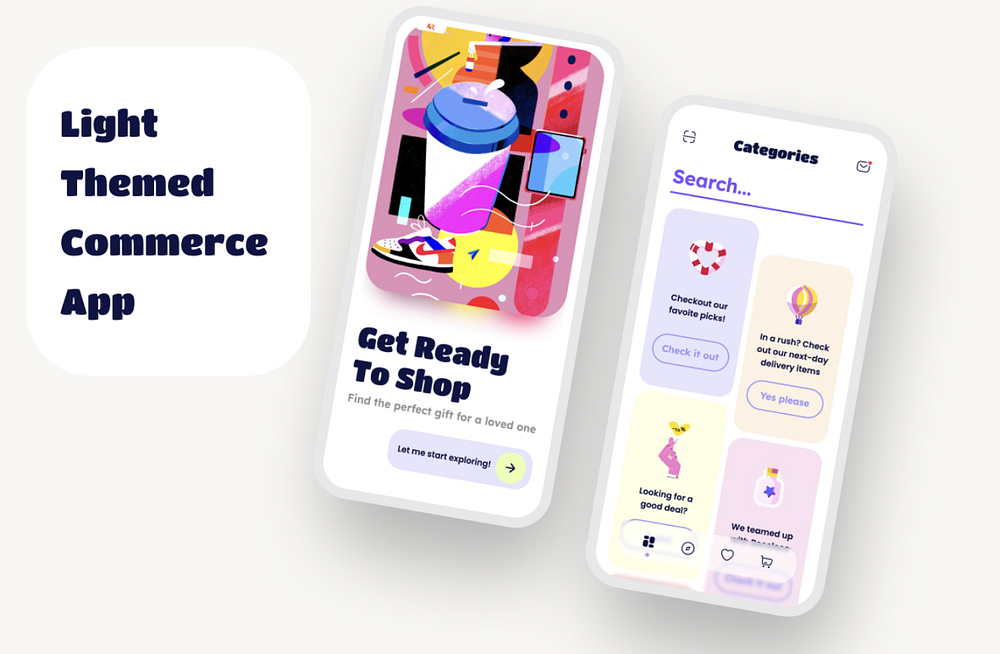
Ignite your e-commerce business with our Light Themed E-commerce App template designed specifically for FlutterFlow! This template offers a simple, visually appealing, and impactful design, enhancing the shopping experience for your customers. 🌟 Features:

📱 Simple and user-friendly e-commerce UI
🌈 Light theme for an appealing visual experience
💥 Impactful design to engage and retain users
More info

Eventor — Event Details Screen & Ticket

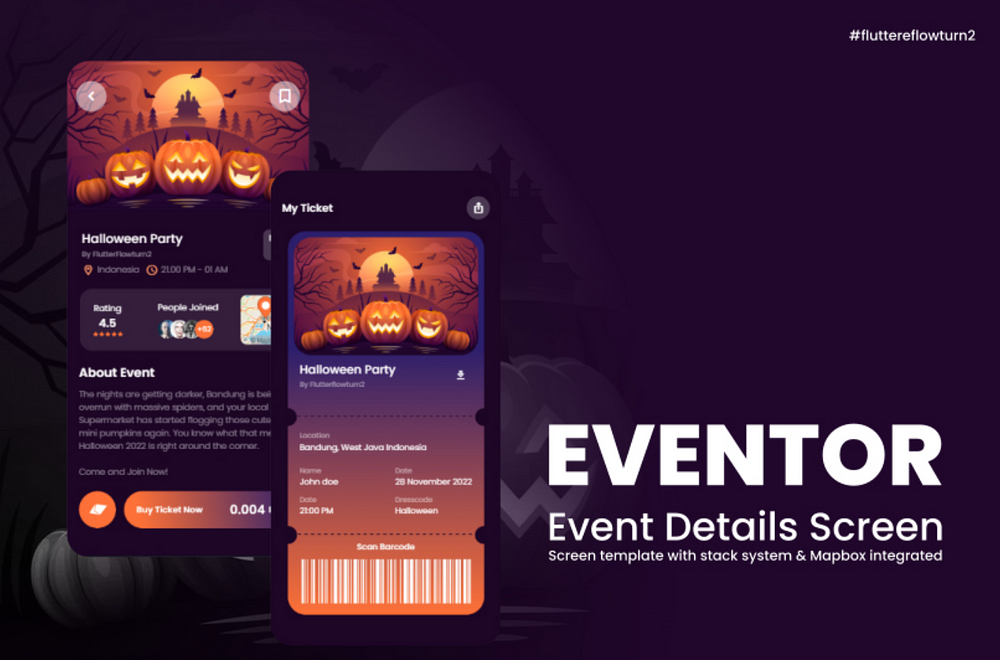
Presenting Eventor — an advanced event details and ticketing screen template for FlutterFlow. Built with a stack structure and integrated with Mapbox, Eventor offers an intuitive event details page and a ticket barcode feature, streamlining the ticketing process for any event. 🎫 Features:

📐1️⃣ Stack Structure: Utilize the highly versatile stack structure for a smooth and responsive user interface.
🌐2️⃣ Mapbox Integration: Enhance user experience with integrated Mapbox functionality, providing real-time location updates for events.
📅3️⃣ Event Details Page: Offer comprehensive event details in a neat and attractive layout, ensuring users have all the information they need.
🔖4️⃣ Ticket Barcode Feature: Simplify the ticketing process with an integrated ticket barcode feature, allowing users to keep track of their tickets digitally.

How to Use:

Implement the Eventor template in your project to offer an enriched event experience, complete with detailed information and seamless ticketing.

More info

Unleash the power of dynamic menu animation with our FlutterFlow Animated Menu App Template. Built on the robust foundation of page state, this template employs the versatility of stacks to bring alive the menu and content animation. Modify the background content as per your needs by updating the page component in the background. Though it’s designed as a single-page template, it’s equipped with components and app state settings, thereby functioning as an app. 😎 Features:

🎨1️⃣ Dynamic Menu Animation: Leverage the power of stacks to create lively animations for your menu and content.
🔄2️⃣ Background Content Modification: Adapt the background content to your project’s needs by updating the page component in the background.
📃3️⃣ Single Page Design: Although designed as a single page, it functions as an app due to the inclusion of components and app state settings.
💡4️⃣ Ease of Use: Download this app, copy the page to your project, and voila — you’re all set. Please remember to remove the background component (component with graph and list) before copying the page.
🚀5️⃣ Menu Animation Trigger: The menu animation is set to trigger on a page state boolean “showMenu”.

How to Use:

Simply download this app and copy the page to your project. Be sure to remove the background component (component with graph and list) prior to copying the page. It’s crucial to copy the page as the menu animation is activated via a page state boolean called “showMenu”.
More info

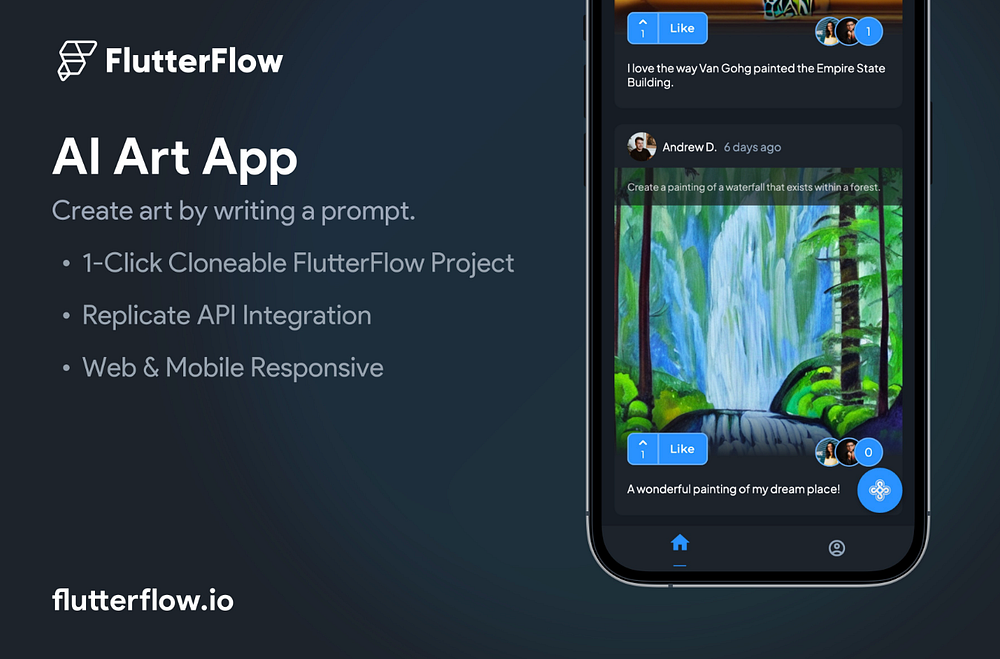
Unleash your creativity with our AI Artistry App, an innovative social media app template powered by FlutterFlow and Replicate. By merely typing an image description, users can witness the magic of Replicate’s ML model transforming their words into stunning visuals.

Features:

📝 User-friendly interface for entering image descriptions
🎨 AI-powered generation of beautiful images based on user input
🔄 Responsive app design for seamless user experience

How to Use:

1️⃣ Create a Replicate account and generate an API key
2️⃣ Retrieve your API key and navigate to the API calls section
3️⃣ Paste the API key in the Header section of each where it says API_KEY_HERE
4️⃣ Enjoy transforming your words into beautiful images!
More info

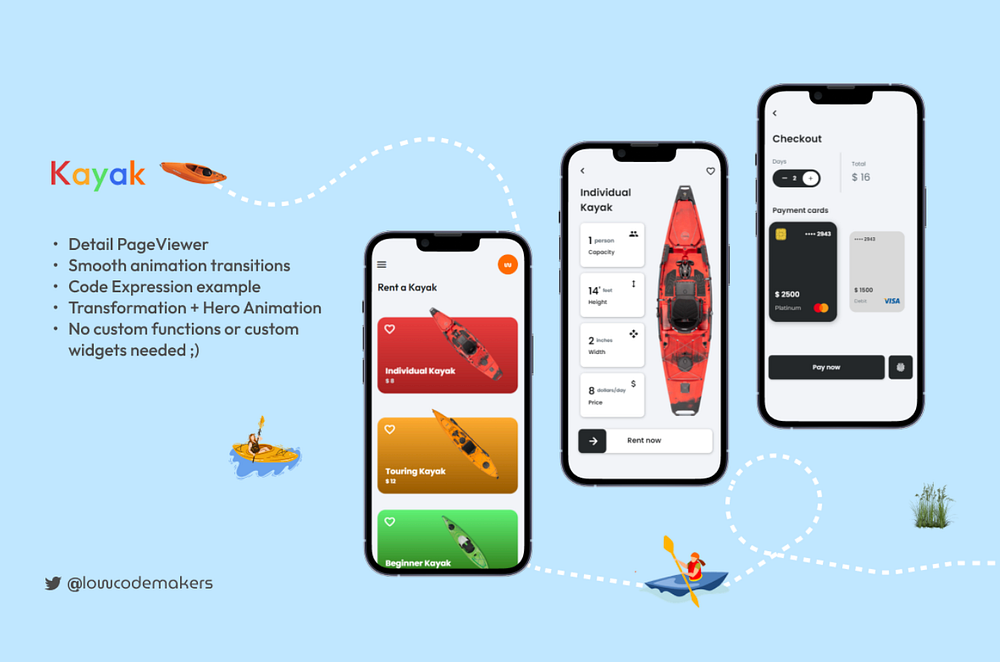
Welcome to KayakFlow, an immersive kayak rental app template crafted meticulously for a seamless user experience. Complete with cutting-edge functionalities and integrated animations, KayakFlow is perfect for businesses looking to streamline their rental services.

Features:

🛶 Detailed kayak listings for informed decisions
🔄 Integrated animations for a dynamic user experience
🛒 Smooth rental and checkout process

How to Use:

1️⃣ Select your preferred kayak from the detailed listings
2️⃣ Rent your kayak with just a few taps
3️⃣ Proceed to checkout to finalize your rental process
4️⃣ Enjoy your kayaking adventure!
More info

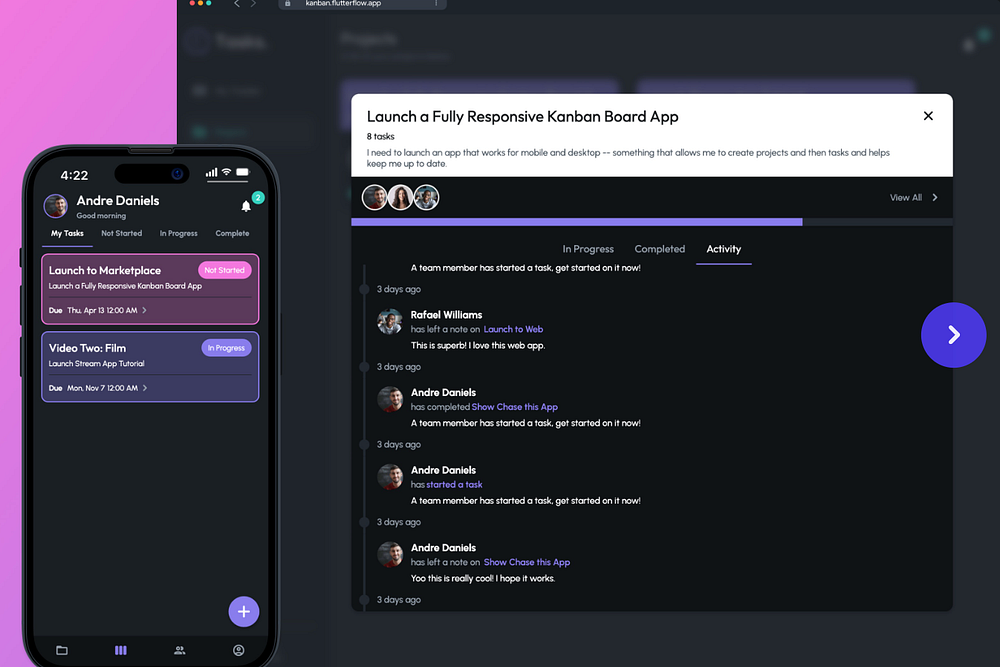
Presenting AgileFlow, a responsive Kanban Board App Template designed with the robust capabilities of FlutterFlow. Experience superior project management with this intuitive app that allows for task organization into customizable columns, and easy project prioritization across various devices.

Features:

🔄 Responsive design for seamless use on any device
📝 Customizable columns for task organization
🚀 Prioritize projects with a simple drag-and-drop interface
🔒 Firebase integration for secure and reliable data storage

How to Use:

1️⃣ Clone this project into your FlutterFlow workspace
2️⃣ Connect to your Firebase account for data management
3️⃣ Your customized Kanban Board App is ready to boost productivity!

More info

Unleash your creativity with the Sketch-to-Image FlutterFlow x Replicate App Template! Draw your vision and let Replicate’s advanced ML model transform it into a stunning image. Perfect for artists, designers, and anyone who wants to visualize their ideas quickly and easily.

Features:

✏️ User-friendly sketching interface
🧠 Powered by Replicate’s ML model
🖼️ Instantly transforms sketches into images
🔄 Quick and easy setup

How to Use:

1️⃣ Create a Replicate account and generate an API key
2️⃣ Clone this template into your FlutterFlow project
3️⃣ Paste your API key in the “Replicate API” group where it says
4️⃣ Your Sketch-to-Image app is ready to bring your visions to life!
More info

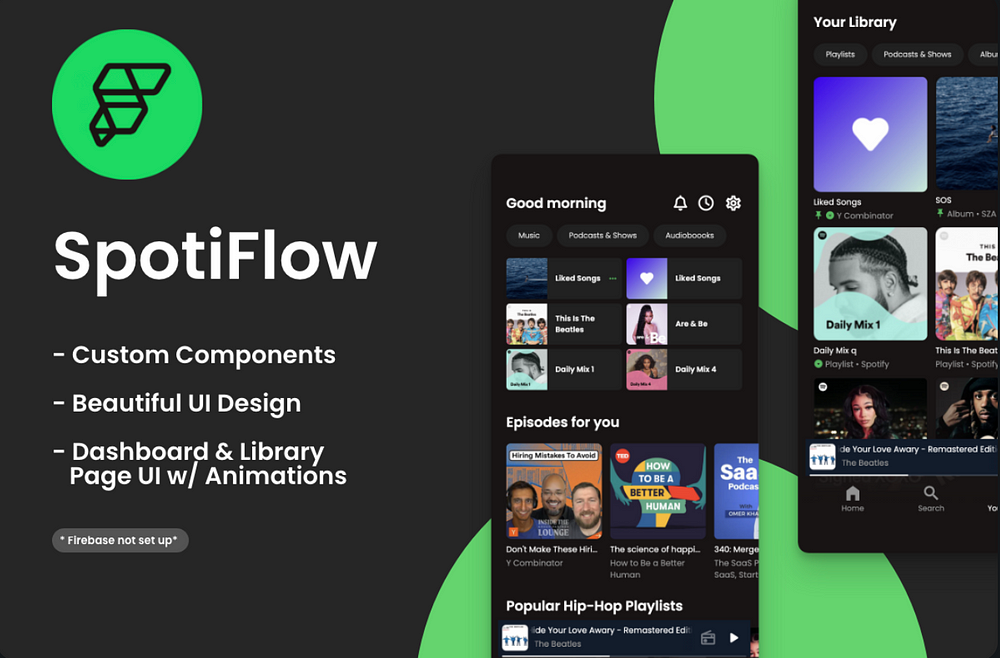
Jumpstart your custom music app development with SpotiFlow, a Spotify-inspired UI template with components and features built specifically for FlutterFlow! With this template, you can quickly utilize the pre-built UI for the Dashboard and Library page, paving the way to your ideal music app UI. Set up Firebase, add notifications, and kickstart your app in no time! How to Use:

🔥 Please note, Firebase integration is not included — you’ll need to set up Firebase according to your preferred architecture to use this within an app. This template includes the UI components/animations and navigation for a seamless development experience.

Features:

🎶 Spotify-inspired UI components for a familiar user experience
📊 Pre-built UI for Dashboard and Library page for quick setup
🔔 Add notifications to keep users engaged
🔧 Easy setup with Firebase for robust backend support
🔄 Seamless navigation for an enhanced user experience
More info

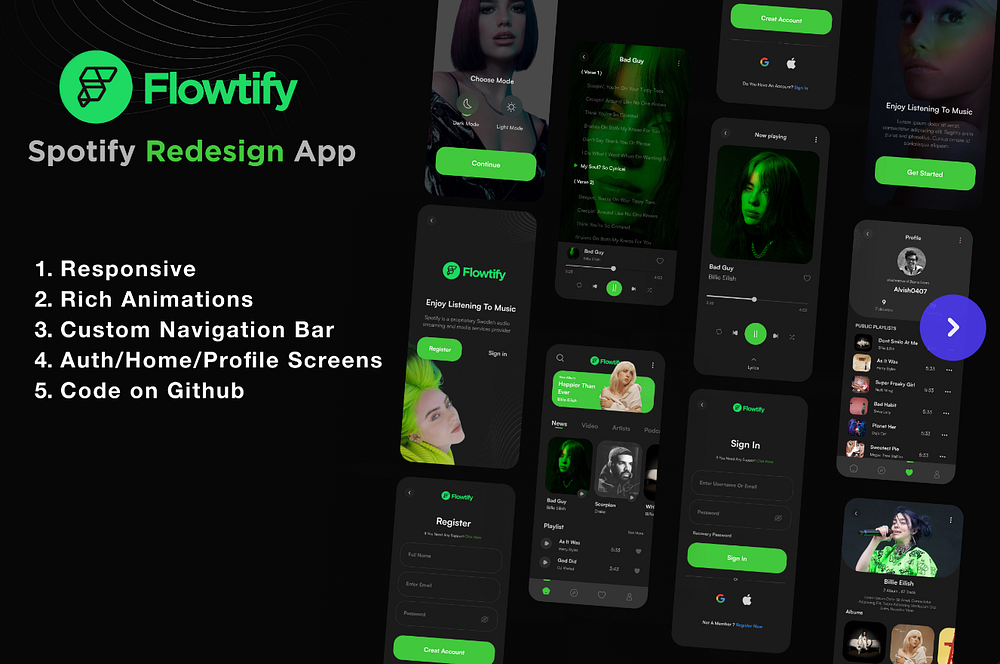
Elevate your music app development with Flowtify, a fully functional template based on Soroush Norozy’s Spotify Redesign UI, tailored for FlutterFlow. This template features a responsive design, mesmerizing animations, and a sleek, modern interface, providing an ideal starting point for your next music app project. 🌟 Features:

📱 Ready-to-use template with a responsive design that seamlessly adapts to any screen size
✨ Eye-catching animations that add a dynamic flair to your app
🚀 Quick and easy setup for a streamlined development process

Flowtify is a perfect fit for developers, designers, and entrepreneurs seeking a turnkey solution to create a unique and engaging music app. With its ready-to-use design, you can launch your app swiftly and concentrate on scaling your business. Try Flowtify today and elevate your music app experience! How to Use:

🚀 Launch your music app in no time using our sleek, modern interface and responsive design.

More info

Supercharge your automotive app development with our Tesla App template, perfectly designed for FlutterFlow. This template mimics the stunning, user-friendly interface of the renowned Tesla app, providing a seamless experience for users. Whether you’re creating an app for electric vehicles or traditional ones, this template provides a strong foundation with its intuitive navigation, sleek design, and comprehensive vehicle management features. 🌟 Features:

  • 🔋 Electric vehicle management features
  • 🌐 Intuitive navigation for easy access to features
  • 🎨 Sleek design inspired by Tesla’s own app
  • 🚀 Ideal for electric and traditional automotive apps

How to Use:

1️⃣ Clone the template into your FlutterFlow project
2️⃣ Customize the features and design to suit your vehicle range and branding
3️⃣ Your personalized Tesla-like app is ready to impress your users!
More info

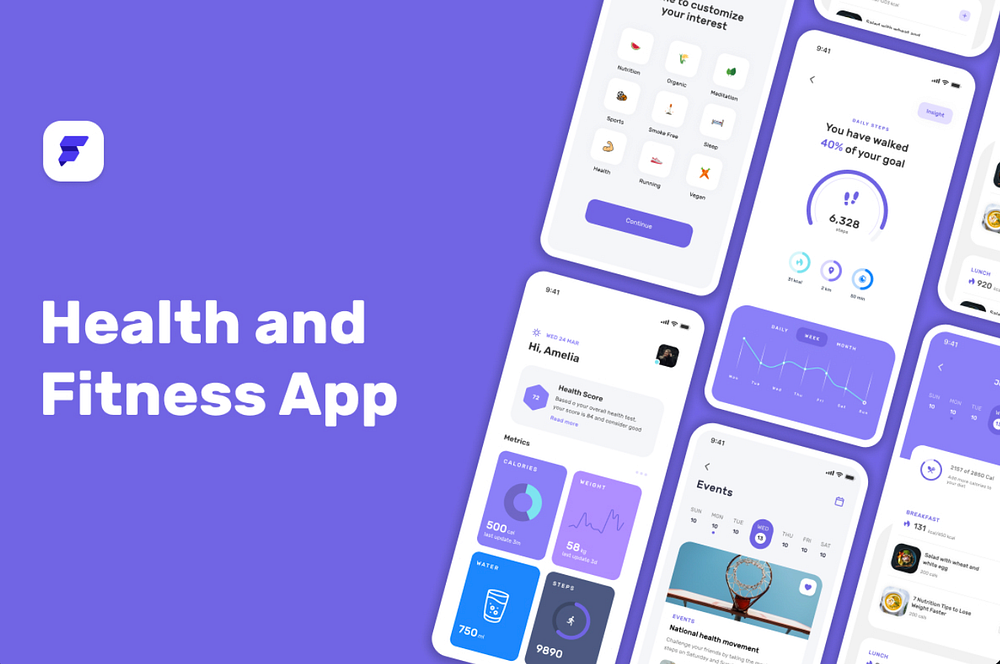
Harness the power of healthy living with our Health & Fitness App template, specifically designed for FlutterFlow. This template features a robust array of tools such as exercise tracking, meal planning, goal setting, and progress monitoring, making it an ideal solution for fitness enthusiasts and health-conscious individuals. Its sleek design and user-friendly interface make it perfect for developers aiming to create engaging and effective health and fitness apps. 🌟 Features:

🏋️‍♀️ Exercise tracking for workout management
🍽️ Meal planning for nutritional guidance
🎯 Goal setting to keep users motivated
📈 Progress monitoring for tracking improvements
🎨 Sleek design for a visually appealing user experience
👆 Easy-to-use interface for seamless navigation

More info

Chat GPT — Industry Prompter App

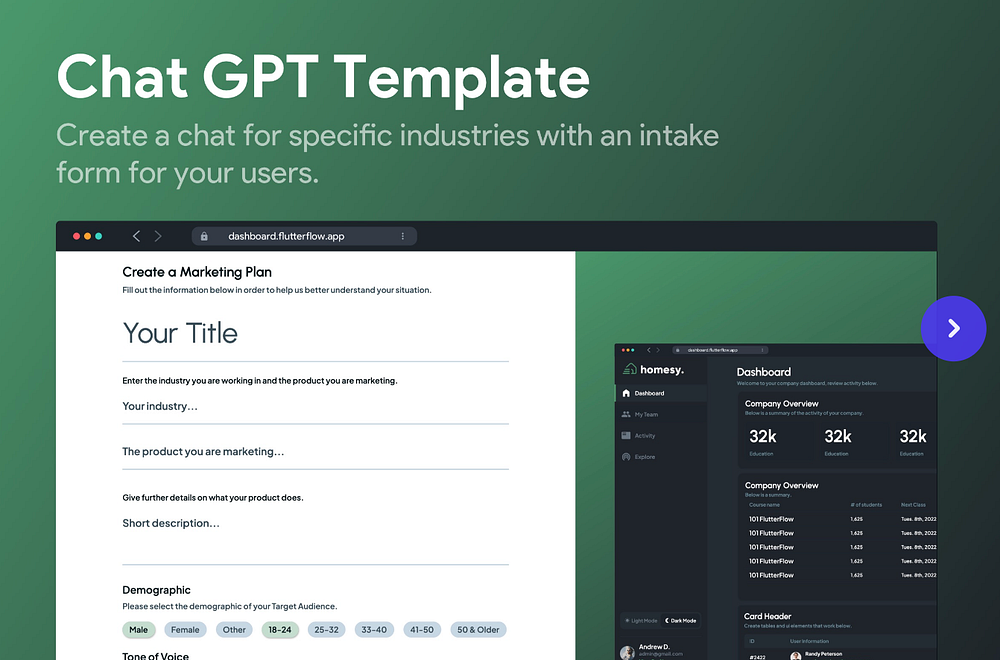
Craft a personalized user experience with our Chat GPT — Industry Prompter App template, specifically designed for FlutterFlow. This simple yet powerful app lets you generate initial prompts tailored to your users’ needs. While it currently features a marketing plan example, its flexibility allows adaptation to any industry with ease. Expand and customize it to suit your unique requirements! How to Use:

1️⃣ Copy the template into your FlutterFlow project
2️⃣ Customize the prompt content to align with your industry needs
3️⃣ Expand and enhance the features as needed
4️⃣ Your personalized Industry Prompter App is ready to engage your users!

Features

🎯 Creates industry-specific initial prompts for enhanced user experience💡 Versatile design allows application to any industry
🔧 Easily expandable and customizable to match your unique needs
🚀 Quick and easy setup for a fast-paced development process

More info

Flutter Flow marketplace provided by code.market

Are you a developer skilled in FlutterFlow? Do you have a knack for creating brilliant and functional templates? If so, code.market could be the FlutterFlow marketplace for you to not only share your work with the world but also earn income from your creations.

 Reference

 https://cdmrkt.medium.com/the-10-best-flutterflow-app-templates-in-2023-80151c0c4ace
Generate AI Images with ChatGPT


Image created with ChatGPT

You must be for sure familiar with AI tools used for image generation, such as Midjourney, Leonardo AI, Photoshop, and so on. You must also be for sure familiar with ChatGPT, which, unlike the previous tools, is mostly used for text and code generation.

But what if I tell you that you can now generate images within ChatGPT?

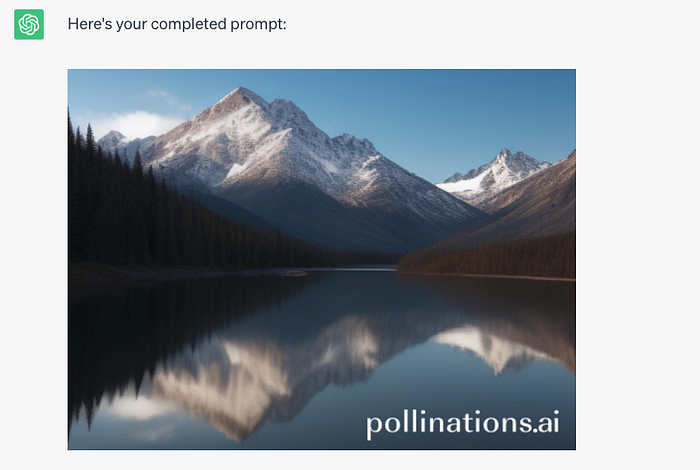
Well, that’s true! Now it’s possible to generate AI images using the free version of ChatGPT. Let me show you how to do it!

Step #1: Ask ChatGPT to be a prompt generator

ChatGPT won’t get what you mean if you just write ‘generate image’ (it’ll tell you that it’s not possible). So, you gotta be a little sneakier and tweak your prompt to get the job done.

Here’s the prompt we’ll use.

Prompt: You are an image prompt generator. First, ask me for a description of an image, and help me fill in the following. Then, output the completed prompt. ![Image] (https://image.pollinations.ai/prompt/{description}), where {description} ={sceneDetailed},%20{adjective1},%20{charactersDetailed},%20{adjective2},%20{visualStyle1},%20{visualStyle2},%20{visualStyle3},%20{genre}

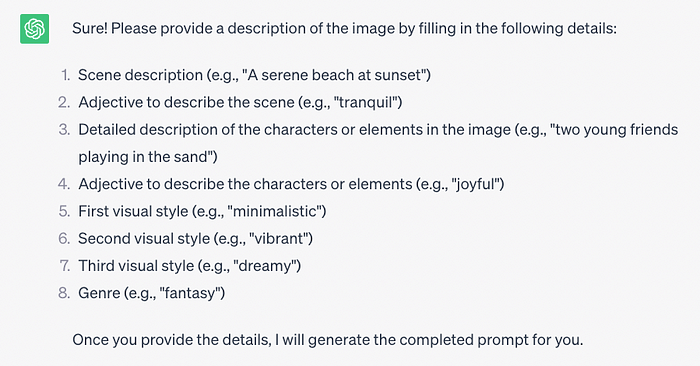
After using the prompt, you should get the following response.

Screenshot

Step #2: Provide a description of the image

Now I have to clarify what exactly I would like to see in my image. For this example, I’ll use the prompt below.

Prompt: a lake with mountains


Reference:

https://artificialcorner.com/now-you-can-generate-ai-images-with-chatgpt-heres-how-497f99c12d56

Top 8 Algorithms Every Programmer Should Know


In programming, an algorithm is a set of instructions or a procedure for solving a specific problem or achieving a specific task. Algorithms can be expressed in any programming language and can be as simple as a sequence of basic operations or as complex as a multi-step process involving different data structures and logic. The main goal of an algorithm is to take in input, process it and provide an output that is expected. Algorithms can be classified based on the time and space complexity, the technique used for solving the problem, and the type of problem it solves. Examples of algorithm are sorting, searching, graph traversals, string manipulations, mathematical operations, and many more.

Algorithms we will be talking about:

  1. Sorting algorithms: Sorting is a fundamental operation in computer science and there are several efficient algorithms for it, such as quicksort, merge sort and heap sort.
  2. Search algorithms: Searching for an element in a large dataset is a common task and there are several efficient algorithms for it, such as binary search and hash tables.
  3. Graph algorithms: Graph algorithms are used to solve problems related to graphs, such as finding the shortest path between two nodes or determining if a graph is connected.
  4. Dynamic programming: Dynamic programming is a technique for solving problems by breaking them down into smaller subproblems and storing the solutions to these subproblems to avoid redundant computation.
  5. Greedy algorithms: Greedy algorithms are used to solve optimization problems by making the locally optimal choice at each step with the hope of finding a global optimum.
  6. Divide and Conquer: Divide and Conquer is an algorithm design paradigm based on multi-branched recursion. A divide and conquer algorithm breaks down a problem into sub-problems of the same or related type, until these become simple enough to be solved directly.
  7. Backtracking: Backtracking is a general algorithmic technique that considers searching every possible combination in a systematic manner, and abandons a particular path as soon as it determines that it cannot be part of the solution.
  8. Randomized Algorithm: Randomized algorithms use randomness to solve a problem. It can be useful to solve problems that cannot be solved deterministically or to improve the average case complexity of a problem.

These algorithms are widely used in various applications and it’s important for a programmer to have a strong understanding of them. So i will try my best to explain them.

  1. Sorting algorithms:
  • Quicksort: Quicksort is a divide-and-conquer algorithm that chooses a “pivot” element from the array and partitions the other elements into two sub-arrays, according to whether they are less than or greater than the pivot. The sub-arrays are then sorted recursively.
def quicksort(arr):
if len(arr) <= 1:
return arr
pivot = arr[len(arr) // 2]
left = [x for x in arr if x < pivot]
middle = [x for x in arr if x == pivot]
right = [x for x in arr if x > pivot]
return quicksort(left) + middle + quicksort(right)

print(quicksort([3,6,8,10,1,2,1]))
  • Merge Sort: The merge sort algorithm is a divide-and-conquer algorithm that divides an array in two, sorts the two halves, and then merges them back together.
def merge_sort(arr):
if len(arr) <= 1:
return arr
mid = len(arr) // 2
left = merge_sort(arr[:mid])
right = merge_sort(arr[mid:])
return merge(left, right)

def merge(left, right):
result = []
i = 0
j = 0
while i < len(left) and j < len(right):
if left[i] < right[j]:
result.append(left[i])
i += 1
else:
result.append(right[j])
j += 1
result += left[i:]
result += right[j:]
return result
print(merge_sort([3,6,8,10,1,2,1]))
  • Heap Sort: The heap sort algorithm is a comparison-based sorting algorithm that builds a heap from the input elements and then repeatedly extracts the maximum element from the heap and places it at the end of the sorted output array.
def heap_sort(arr):
n = len(arr)
for i in range(n, -1, -1):
heapify(arr, n, i)
for i in range(n-1, 0, -1):
arr[i], arr[0] = arr[0], arr[i]
heapify(arr, i, 0)

def heapify(arr, n, i):
largest = i
l = 2 * i + 1
r = 2 * i + 2
if l < n and arr[i] < arr[l]:
largest = l
if r < n and arr[largest] < arr[r]:
largest = r
if largest != i:
arr[i], arr[largest] = arr[largest], arr[i]
heapify(arr, n, largest)
print(heap_sort([3,6,8,10,1,2,1]))

2. Search algorithms:

  • Binary Search: Binary search is an efficient algorithm for finding an item from a sorted list of items. It works by repeatedly dividing in half the portion of the array being searched, until the target value is found.
def binary_search(arr, x):
low = 0
high = len(arr) - 1
mid = 0
while low <= high:
mid = (high + low) // 2
if arr[mid] < x:
low = mid + 1
elif arr[mid] > x:
high = mid - 1
else:
return mid
return -1
print(binary_search([1,2,3,4,5,6,7], 4))
  • Hash Tables: A hash table is a data structure that maps keys to values, using a hash function to compute an index into an array of buckets or slots, from which the desired value can be found.
class HashTable:
def __init__(self):
self.size = 10
self.keys = [None] * self.size
self.values = [None] * self.size

def put(self, key, data):
index = self.hash_function(key)
while self.keys[index] is not None:
if self.keys[index] == key:
self.values[index] = data # update
return
index = (index + 1) % self.size
self.keys[index] = key
self.values[index] = data

def get(self, key):
index = self.hash_function(key)
while self.keys[index] is not None:
if self.keys[index] == key:
return self.values[index]
index = (index + 1) % self.size
return None

def hash_function(self, key):
sum = 0
for pos in range(len(key)):
sum = sum + ord(key[pos])
return sum % self.size

t = HashTable()
t.put("apple", 10)
t.put("orange", 20)
t.put("banana", 30)
print(t.get("orange"))

3. Graph Algorithm :

  • Dijkstra’s shortest path algorithm: Dijkstra’s shortest path algorithm is an algorithm for finding the shortest path between nodes in a graph.
import heapq

def dijkstra(graph, start):
heap = [(0, start)]
visited = set()
while heap:
(cost, v) = heapq.heappop(heap)
if v not in visited:
visited.add(v)
for u, c in graph[v].items():
if u not in visited:
heapq.heappush(heap, (cost + c, u))
return visited

graph = {
'A': {'B': 2, 'C': 3},
'B': {'D': 4, 'E': 5},
'C': {'F': 6},
'D': {'G': 7},
'E': {'G': 8, 'H': 9},
'F': {'H': 10},
'G': {},
'H': {}
}
print(dijkstra(graph, 'A'))

4. Dynamic Programming:

  • Fibonacci sequence: A classic example of a problem that can be solved using dynamic programming is the Fibonacci sequence.
def fibonacci(n):
if n <= 0:
return 0
elif n == 1:
return 1
else:
return fibonacci(n-1) + fibonacci(n-2)


print(fibonacci(10))

5. Greedy Algorithms:

  • Huffman coding: Huffman coding is a lossless data compression algorithm that uses a greedy algorithm to construct a prefix code for a given set of symbols.
from collections import Counter, namedtuple

def huffman_encoding(data):
"""
Generates a Huffman encoded string of the input data
"""
# Create a frequency counter for the data
freq_counter = Counter(data)
# Create a namedtuple for the Huffman tree nodes
HuffmanNode = namedtuple("HuffmanNode", ["char", "freq"])
# Create a priority queue for the Huffman tree
priority_queue = PriorityQueue()
# Add all characters to the priority queue
for char, freq in freq_counter.items():
priority_queue.put(HuffmanNode(char, freq))
# Combine nodes until only the root node remains
while priority_queue.qsize() > 1:
left_node = priority_queue.get()
right_node = priority_queue.get()
combined_freq = left_node.freq + right_node.freq
combined_node = HuffmanNode(None, combined_freq)
priority_queue.put(combined_node)
# Generate the Huffman code for each character
huffman_code = {}
generate_code(priority_queue.get(), "", huffman_code)
# Encode the input data
encoded_data = ""
for char in data:
encoded_data += huffman_code[char]
return encoded_data, huffman_code
print(huffman_encoding("aaaaabbbcccc"))

6. Divide and Conquer :

  • Merge Sort: already explained above

7. Backtracking:

  • The N-Queens Problem: The N-Queens problem is a classic problem that can be solved using backtracking. The goal is to place N queens on an NxN chessboard in such a way that no queen can attack any other queen.
def solveNQueens(n):
def could_place(row, col):
# check if a queen can be placed on board[row][col]
# check if this row is not under attack from any previous queen in that column
for i in range(row):
if board[i] == col or abs(board[i] - col) == abs(i - row):
return False
return True

def backtrack(row=0, count=0):
for col in range(n):
if could_place(row, col):
board[row] = col
if row + 1 == n:
count += 1
else:
count = backtrack(row + 1, count)
return count
board = [-1 for x in range(n)]
return backtrack()
print(solveNQueens(4))

This algorithm starts placing queens in the first row, and for every placed queen it checks if it is under attack from any previous queen. If not, it proceeds to the next row and repeats the process. If a queen is placed in a position where it is under attack, the algorithm backtracks and tries a different position. This continues until all queens are placed on the board without any attacking each other.

8. Randomized Algorithm: — Randomized QuickSort: A variation of quicksort algorithm where pivot is chosen randomly.

import random

def randomized_quicksort(arr):
if len(arr) <= 1:
return arr
pivot = random.choice(arr)
left = [x for x in arr if x < pivot]
middle = [x for x in arr if x == pivot]
right = [x for x in arr if x > pivot]
return randomized_quicksort(left) + middle + randomized_quicksort(right)

print(randomized_quicksort([3,6,8,10,1,2,1]))

These are some of the most commonly used algorithms that every programmer should be familiar with. Understanding these algorithms and their implementation can help a programmer to make better decisions when it comes to designing and implementing efficient solutions.

 Reference:

https://python.plainenglish.io/top-8-algorithms-every-programmer-should-know-93c826267938

Monday, April 10, 2023

Using AI to Make Money in 2023


1. Children’s Book Author

Utilize ChatGPT to script your tale, and subsequently employ MidJourney or Stable Diffusion to construct illustrations for each page. Afterward, dispense your literary composition via Amazon’s KDP (Kindle Direct Publishing) platform in both tangible and digital formats.

Tools:

ChatGPT (OpenAI)

Midjourney

2. AI Created Affiliate Sites

Craft an engaging blog showcasing an affiliate product, employing powerful generative AI text tools such as Copy.ai or Jasper to produce a plethora of persuasive content that highlights the product’s advantages. Additionally, leverage the capabilities of platforms like ChatGPT to summarize the product’s sales page and generate lists of features, pros, and cons. With these powerful tools at your disposal, the possibilities for creating high-quality, informative content for your dedicated affiliate site are endless. Maximize the potential of these tools to create content with a high level of perplexity and burstiness, while minimizing predictability, to keep your readers engaged and enthralled.

Tools:

Copy.AI

Jasper

Fliki

3. Clean Up people's Images

In today’s age of artificial intelligence, a plethora of tools exists to help you effortlessly remove pesky blemishes and backgrounds from your images. These tools can also upscale low-quality, pixelated images, and even eradicate those irksome watermarks that can ruin an otherwise perfect shot. Why not offer a professional photo restoration service using a combination of these cutting-edge tools? Your clients will be thrilled with the results!

Tools:

Watermark Remover

AI Image Upscaler

Gigapixel AI Upscaler

ClipDrop

Magic Eraser

4. Sell Voiceover Impressions on Fiverr

Transforming your voice to sound like a celebrity is now easier than ever with tools like Voice.ai. You can channel the booming vocals of Morgan Freeman, the innovative inflections of Elon Musk, the polished intonations of Joe Biden, or even the bombastic bluster of Donald Trump. Imagine the possibilities: record your impressions and offer them up on Fiverr or other platforms. With a simple tool like this, you can take your vocal skills to the next level and explore the limitless potential of voice modulation.

Tools:

Voice.ai

5. Convert YouTuber videos to TikToks

Discover up-and-coming YouTubers who are looking to expand their audience. Reach out to them and propose a partnership where you take charge of their TikTok presence. By employing cutting-edge AI tools, you can easily transform their existing content into captivating TikTok videos. Offer your services at a reasonable rate to help them save time and energy, and don’t be afraid to take on all they clients you can. This service is in high demand and has the potential to be incredibly lucrative.

Tools:

ClipMaker

6. Create a “No Face” YouTube Channel

Selecting a highly sought-after topic with substantial viewership on YouTube is the first step in this process, and you can do so by utilizing a tool such as VidIQ. Once you have done so, employ a tool like Tome or Canva to produce captivating visuals. Using a text-to-speech generator to articulate your audio and subsequently merging everything together in Davinci Resolve for no cost will provide you with an efficient strategy for producing AdSense revenue-generating “no face” YouTube videos. Voila!

Tools:

vidIQ

TubeBuddy

Tome

Fliki

7. Create AI-generated T-Shirts

Selling POD t-shirts has become increasingly effortless with online platforms such as Printful and Printify. By identifying a fervent group of consumers, one can leverage tools like InstantArt or MidJourney to create a plethora of designs, ultimately leading to a significant increase in revenue.

Tools:

Midjourney

InstantArt

8. Create Adult Coloring Books

Midjourney offers a unique feature called the “coloring book” prompt, which provides users with a collection of intricate black and white images ready to be brought to life with a burst of colors. By selecting a specific theme, one can create a series of stunning artworks, which can then be combined to form a beautiful coloring book. These books can be published on demand through various print-on-demand platforms and sold on popular marketplaces like Amazon, Etsy, or your own e-commerce store. Unleash your creativity and embark on a journey to create something truly exceptional.

Tools:

Midjourney

9. Manage Advertising Campaigns

Leverage the power of AdCreative AI to craft compelling Facebook ads and offer top-notch ad management services to your clients. With AdCreative, you can effortlessly generate captivating copy, select the ideal image, and optimize targeting to yield maximum results. Your only task is to secure clients and operate the software for them, leaving the heavy lifting to AdCreative AI.

Tools:

AdCreative.ai

10. Create Slide Decks For Companies

Tapping into the power of advanced AI technology, tools such as Tome have revolutionized the process of creating presentations. With just a few clicks, users can input a topic of their choice, sit back, and watch as a full-fledged slide deck is generated before their very eyes. Thanks to its sophisticated algorithms, Tome not only crafts the written content for each slide but also selects images that perfectly complement the text. As the world of digital marketing continues to evolve at breakneck speed, Video Sales Letters (VSLs) and webinars have emerged as hot commodities. For marketers looking to save time and streamline their operations, outsourcing the creation of slide decks to skilled professionals is an increasingly popular option.

Tools:

Tome

SlidesAI

ChatBCG

11. Sell Art on Etsy

Etsy is a great platform for selling digital prints. To increase your chances of success, start by researching what’s currently trending on the platform. Then, utilize tools like Stable Diffusion or MidJourney to create high-quality images similar to the popular ones. Enhance the resolution of your images using an AI-powered image upscaler. Once your images are ready, list them on Etsy and use the power of ChatGPT to create compelling and persuasive descriptions. You can even use descriptions from similar artwork and get ChatGPT to rephrase them for you, adding a unique touch to your listings. By incorporating these techniques, you can increase the likelihood of selling your artwork and expanding your customer base.

Tools:

Midjourney

AI Image Upscaler

ChatGPT (OpenAI)

12. Podcast Shownotes Creator

If you’re looking for a way to streamline your podcast workflow, you might consider utilizing one of the many tools available that can listen to your audio content and generate a concise summary and accompanying show notes. Of course, it’s important to ensure that the final product is polished and error-free before delivering it to your client. So, take the time to proofread and edit as necessary to ensure that your work meets the highest standards of quality.

Tools:

Deciphr AI

Melville App

13. Sell Copywriting Services

Utilize the plethora of AI copywriting tools readily accessible to you and allow them to create compelling content on your behalf. Targeting info-marketers, ecommerce stores, and SaaS companies, offer to generate copy that converts. Leverage AI tools to craft the initial draft and then add your personal touch to enhance the copy. Alternatively, input their current copy into the AI tools to undergo a complete rewrite. Market this valuable service on social media, Fiverr, or Upwork to reach a wider audience.

Tools:

Jasper

Copy.AI

14. Adobe Stock

With the advent of technology, we now have access to AI-generated images through Adobe Stock. By employing innovative tools like Stable Diffusion or MidJourney, you can effortlessly generate an array of visually striking stock photos that cater to popular searches such as business people, landscapes, and current events. What’s more, you can monetize your creative output by submitting your creations to Adobe Stock and receiving commissions whenever your images get used.

Tools:

Midjourney

Gigapixel AI Upscaler

AI Image Upscaler

Wirestock

15. Social Media Management

Propose to take charge of your company’s social media presence and elevate it to new heights. Utilize the innovative capabilities of ChatGPT to create compelling and relevant posts and tweets that will capture your audience’s attention. With cutting-edge tools like Replai, you can also engage with other relevant Twitter accounts, leaving a lasting impression with perfectly-crafted AI-generated responses. The immense value that this service can bring to the right clients is truly unparalleled, and will undoubtedly result in a significant boost to their Twitter accounts.

Tools:

Replai

TweePT3

TweetEmote

Tweet Hunter

Tweet Assist App

16. Sell Your AI Prompts

The emergence of “Prompt Engineering” is rapidly gaining traction in mainstream discourse. It’s astonishing to witness the trend of individuals offering their top-notch prompts for sale and generating a substantial income stream. The advent of tools such as PromptBase has facilitated the listing of premium image generation prompts for a nominal fee, and the market is responding in kind with tremendous enthusiasm. In fact, certain prompts have been known to fetch exorbitant prices, amounting to several hundred dollars in some instances.

Tools:

PromptBase

17. Thumbnail Creation

Since October of 2022, I have exclusively relied on AI to create every single thumbnail for my YouTube videos. Through MidJourney, one simply inputs a prompt related to the video’s subject matter and the AI generates a flawless image. Once generated, one can import the image into Canva to further enhance it with text and other graphic elements. This service can be sold through a variety of channels, such as Fiverr, Upwork, social media platforms, or any other marketplace that caters to the demand for YouTube thumbnails.

Tools:

Midjourney

Canva Image Generator

18. YouTube Optimization Expert

In today’s digital landscape, content creators can rely on advanced tools like VidIQ and CreatorML to enhance their YouTube channels. These powerful platforms provide valuable insights and recommendations for optimizing content, from analyzing titles and thumbnails to predicting the most effective combinations that will result in maximum click-through rates. By harnessing the power of AI, creators can fine-tune their strategies and stay ahead of the curve in a highly competitive online environment. With the right tools and techniques at their disposal, anyone can achieve success and build a devoted following on this popular platform.

Tools:

TubeBuddy

vidIQ

CreatorML

Source:

https://endasheridan.medium.com/18-ways-im-using-ai-to-make-money-in-2023-ca3a07c49ee4